
If you’ve ever trained someone and watched confusion set in, you know the feeling.
You explain the steps… and they still can’t do it.
The video above includes one way you can help your learner get more out of the material you are sharing. Watch the video if you want, and then keep reading for how this all fits into the big picture.
The thing is, as adults with expertise and experience in work, we learn by engaging with the content.
Here’s how engagement impacts learning:
- Hearing the steps = weak
- Watching the steps = better
- Discussing the steps = stronger
- Answering questions = getting there
- Doing the steps = solid
- Teaching someone else = excellent
Using a framework for training planning
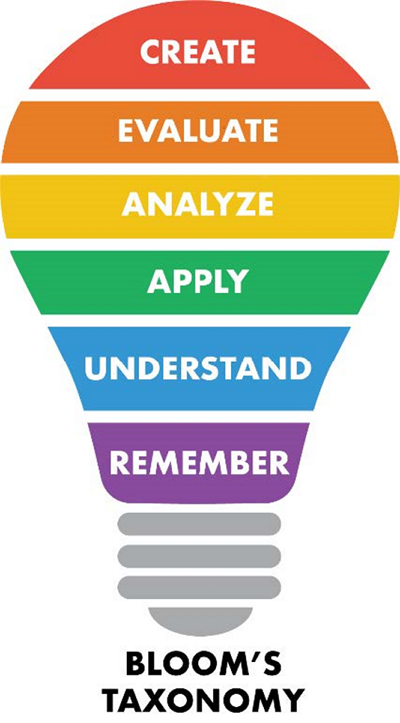
If you set specific goals for the training, learning improves. To do this, use a framework like Bloom’s Taxonomy. It moves from simple skills like remembering to more complex skills like analyzing, applying, and creating. The higher the goal, the more engagement is required.
In the graphic below, the simpler levels of learning and engagement are at the bottom in this light bulb illustration, while the more complex, higher levels are at the top.
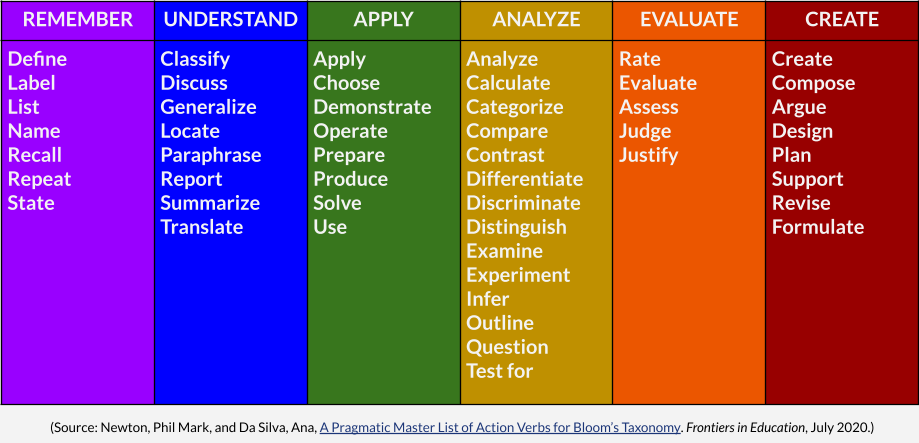
If you need more specific action verbs, tools like the Pragmatic Master List of Action Verbs (below) can help clarify what performance should look like. In the diagram below, the learning levels go from simple (left) to complex (right).
Customer ordering example
Whether you are using Bloom’s Taxonomy or its more detailed cousin, the Pragmatic Master List of Action Verbs for Bloom’s Taxonomy, the most important idea is that higher-level your learning goal is, the more engagement with the material is needed.
Let’s say you need to teach your new employee how to take a phone order from a customer. Keeping this simple, let’s say the steps are:
- Greet the customer
- Listen carefully and provide options
- When they select one, create a new customer record in your CRM / ordering system
- Get client info, then add the order details
- Get billing info
- Finalize order with customer
- Follow up with an email
Setting the goal using the framework
A vague goal might be: “Know how to enter orders.” But what does “know” mean?
Using Bloom’s Taxonomy, or its more detailed cousin, you could say the goal is to be able to RECALL the steps, which is in the first, “remember,” learning level.
Do you also want them to be able to CLASSIFY whether the caller is a B2C or B2B customer?
Do you want them to be able to USE the CRM directly?
If the caller is trying to decide between 2 options, does your employee need to be able to COMPARE them for the customer?
Do you need them to ASSESS when is the right time for an upsell?
After the sale, do you need them to COMPOSE a confirmation email to the customer?
If so, you have six learning goals, not just one. And each of those verbs has to be something you can confirm they can do.
If your goal is performance, passive explanation won’t get you there. Learners must actively do what you expect them to do after training.
The video shares one quick way to increase engagement. There are many others — the key is choosing activities that mirror the real performance you expect.